





 Jul 10,2026
  By Nucleus Team
For many marketing teams, campaign execution is not slowed down by strategic decisions or technology limitations but by the sole fact that the campaign must be approved by multiple people before it goes out the door.
Unless you are running your approvals through a centralized platform (like Nucleus) you probably find yourself chasing people over Slack or Email, trying to track down who approved what, what got done and what’s missing.
Before long, what should have been a quick review becomes a week-long process.
The good news is that you do not need a full reorganization or a six-month transformation project to improve your approval process. In many cases, you can make a major improvement in a single day.
1. A Simple Approval Framework: Why, How, and What
A helpful way to simplify approvals is to give stakeholders a clear framework for how they should review campaigns.
Many reviewers are unsure what they are supposed to focus on. They end up commenting on everything because there is no structure.
You can use a simple framework inspired by Simon Sinek’s Golden Circle:
1. Who Approves
Start by defining who is it that is approving and what is their role, are the sole approver? Do you need approval from everyone?
2. Why They Need to Approve
Continue by helping reviewers understand why they are involved.
For example:
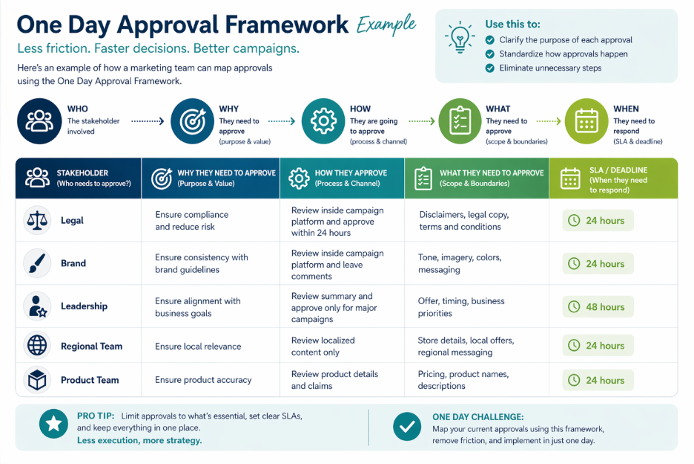
- Legal is reviewing for compliance and risk
- Brand is reviewing for consistency and tone
- Leadership is reviewing for business alignment
- Regional teams are reviewing for local relevance
When people understand why they are part of the process, they are more likely to stay focused on the areas that matter.
3. How They Are Going to Approve
Next, define how the approval process should work.
For example:
- Where feedback should be submitted
- How quickly feedback is expected
- Whether they are approving, requesting changes, or just reviewing
- What happens if they do not respond within a certain timeframe
This creates consistency and removes confusion around the process itself.
4. What They Need to Approve
Finally, define exactly what each person should review.
For example:
- Legal reviews disclaimers and compliance language
- Brand reviews imagery, tone, and messaging
- Product teams review offers and details
- Regional teams review local information
This prevents situations where everyone comments on everything and creates unnecessary rounds of feedback.
When teams clearly define who, why, how, and what, approvals become faster, more focused, and far less frustrating.
2. The One Day Approval Framework
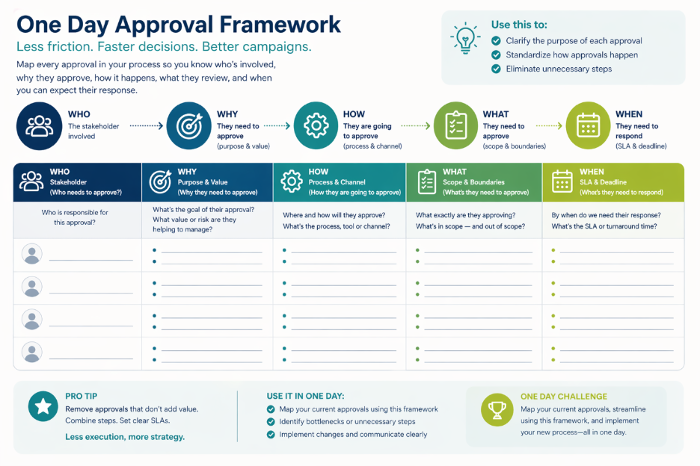
Use this simple worksheet to define who needs to approve, why they are involved, how they should review, and what they should focus on.
How to Use This Tool in five simple steps:
- List every stakeholder involved in your campaign process.
- Define why they are part of the approval flow.
- Clarify how they should review and where they should provide feedback.
- Limit what they should focus on so they do not comment on everything.
- Add a deadline so approvals do not sit in limbo.
Here’s an example of the Framework completed:
As you are going through the exercise ask yourself these questions:
- Does this stakeholder really need to approve every campaign?
- Are they reviewing the right things?
- Is there a simpler way to collect feedback?
- Can some approvals become optional instead of required?
- Are there campaign types that can follow a lighter approval process?
Remember, your goal is to make approvals more focused, repeatable, and faster.
Final Thoughts
We’ve utilized this Framework to help our customers quickly map their approval workflows and understand where the gaps are. And we have adapted some of these ideas inside of Nucleus, to allow teams to have total control and visibility on what happens with their campaigns.